USER LOGIN:
 User:
 Pass:

VIDEOS
Popular:


Guest | Registration   
SCRIPTS PHP TIPS ICONS MUSIC TRAINERS TORRENTS FREEWARE PORTABLE UPDATES NEW

Howto Howto A-Z | A B C D E F G H I J K L M N O P Q R S T U V W X Y Z  
Here's How to Enable Windows 11's New, Modern Run Dialog
December 25, 2025 440 views, 93 downloads, 0 comments
TORRENT | Here's How to Enable Windows 11's New, Modern Run Dialog...


Developer, S.Bojan

Publiser Software Listings

Official site, /author/

N/A /author/

 ?L=cms.NoFacebook

 Filesize: :


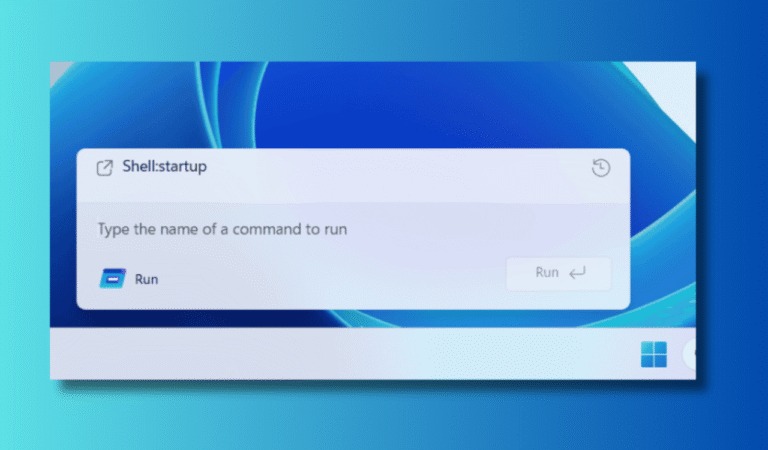
Microsoft is rolling out a modernized Run dialog in Windows 11 with a refreshed interface and deeper system integration. The feature isn’t enabled by default yet, but you can turn it on manually if your device runs the required Insider build.


A refreshed Run dialog arrives in Windows 11

Microsoft has started testing a redesigned Run dialog that looks cleaner and more modern than the classic Windows pop-up. The updated UI stands apart from other Windows 11 dialogs and better matches the operating system’s current design language.

Because Microsoft relies on a staged rollout, many users won’t see the new Run dialog enabled automatically, even on compatible systems.

How to enable the new Run dialog from Settings

If your system already includes the toggle, you can enable the modern Run dialog directly from Settings.

  1. Press Win + I to open Settings.
  2. Go to System and open Advanced.
  3. Turn on the Run dialog to activate the modern version.

How to force-enable the Run dialog using ViVeTool

If the toggle doesn’t appear yet, you can force-enable the feature using ViVeTool. Many Windows enthusiasts use this tool to unlock hidden features before Microsoft enables them for everyone.

  • Download ViVeTool from its GitHub repository and extract it to a folder, such as C:ViVeTool.
  • Press Win, type cmd, right-click Command Prompt, and select Run as administrator.
  • Navigate to the ViVeTool folder by typing:

cd C:ViVeTool

  • Run this command to enable the modern Run dialog:

vivetool /enable /id:57156807,57259990,58527096,58381341

  • Restart your PC.
  • After reboot, open Settings and enable Run dialog if Windows shows the toggle.
The ViVeTool IDs were first shared by Neowin.

Just to be clear, you need a Windows Insider Preview build that includes update KB5072043 to try the new Run dialog. ViVeTool forces hidden feature flags before Microsoft’s staged rollout reaches your device, so you may encounter unfinished visuals or minor bugs.

--------------------------------------------------------------------------------------------
LINKS: S.Bojan
--------------------------------------------------------------------------------------------

Similar files: Downloads:
Here's How to Enable Windows 11's New, Modern Ru (howto)
93
How to Reset All Permissions to Default in Windows 11 (howto)
59
15 ways to speed up Windows 11 (howto)
21
How to Skip 'Let's connect you to a network' (video)
83
How to Change the Computer Name in Windows 11 (howto)
78
New Method For Windows 11 Unsupported PCs (Easiest Yet) (video)
79
How To Hide/Unhide The Taskbar On Windows 11 (video)
68
How To Install Update UHD Graphics Driver on Windows 11/10 (video)
97
How to Clear ALL CACHE & JUNK From Windows 11 & Windows 10 (video)
76
What We Know About Windows 12 (video)
90
Install Windows 11 on Anything!!! (video)
63

Comments 0

There are no comments ......


Note:

Guests comments are allowed ...

  POST YOUR COMMENT


Last added
  • Medal of Honor: Pacific Assault v1.
  • Cyberpunk 2077 Update v2.21
  • Baldur’s Gate 3 Update v4.1.1.607
  • Cyberpunk 2077 Update v2.13 PC game
  • Baldur’s Gate 3 Update v4.1.1.584
  • Baldur’s Gate 3 Toolkit
  • Slender: The Arrival - Remake (V.07
  • Resident Evil 5 Gold Edition (PC ga
  • Resident Evil 4 Remake [Build 11025
  • Medal Of Honor - Allied Assault War
  • Heroes of Might and Magic III Compl
  • Cuphead - GOG (a classic run and gu
  • VA - Spaceout: Synthspace Electroni

  • Rating:
    RATE:
    1 2 3 4 5


    Recent Comments
    Re: Metatogger 7.7.0
    gimpguy: Prior, MetatOGGer gave me trouble and I posted a not so good review but I have since changed that view and there ...
    Re: Metatogger 7.7.0
    jb14813: It makes it so much easier to edit large amount of music titles at once. I am definitely keeping this program! ...
    Re: TKexe Designer 2.0.1.73
    gimpguy: Not the most horrible calendar maker I've used but it is a bit buggy. The refresh crashes every time I used ...
    Re: TrayStatus 5.1 Portable
    oteotd: This is one of my go to apps. Free for personal. I usually only use the Numlock and Caplock settings. This is ...
    Re: IObit Uninstaller 15.2.0.2
    melen001: IObit Uninstaller is the best uninstaller you can have. IObit will perform a "deep scan" to search for ...
    Re: IObit Uninstaller 15.2.0.2
    MinMin: Running it for the first time automatically installs its updater in its own folder without telling you. God knows ...

    Site Author 1998 - 2025 ©, All rights reserved | For your question klik here

    EU-SEARCH | EU-SEARCH Images | FILESI (english) | NEWS