 |
| |
DOWNLOADS: 65
Your downloads should start automatically
If it does not, click restart.
|
|
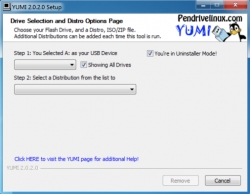
| <p style="box-sizing: border-box; margin-bottom: 10px; color: rgb(95, 109, 128); font-size: 13px;"><b style="box-sizing: border-box; margin-bottom: 10px; color: rgb(95, 109, 128); font-size: 13px;">YUMI</b> (Your Universal Multiboot Installer) is the successor to MultibootISOs. It is a really useful tool that lets you create a Multiboot USB Flash Drive that contains multiple operating systems, antivirus utilities, disc cloning tools an diagnostic tools.</p><p style="box-sizing: border-box; margin-bottom: 10px; color: rgb(95, 109, 128); font-size: 13px;">Where YUMI differs from MultiBootISO's that use grub to boot ISO files directly from USB, YUMI uses syslinux to boot extracted distributions stored on the USB device, and reverts to using grub to Boot Multiple ISO files from USB, if necessary.</p><p style="box-sizing: border-box; margin-bottom: 10px; color: rgb(95, 109, 128); font-size: 13px;">Apart from a few distributions, all the necessary files are stored within the Multiboot folder. This makes for a nicely organized Multiboot Drive, which can still be used for storing other data.</p>
|
|
Connecting you to "Pendrivelinux.com" ...

Added: Nov.01,2018 Size: 1.75mb Views:380
Author: Pendrivelinux.com
License: Freeware
Filename:
Filetype: exe
Languages: Multiple languages
Requirements: Windows (All Versions)
|
|