 |
| |
DOWNLOADS: 267
Your downloads should start automatically
If it does not, click restart.
|
|
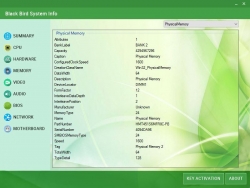
| <p style="box-sizing: border-box; margin-bottom: 10px; color: rgb(95, 109, 128); font-size: 13px;">If you run an older machine and are thinking of upgrading it, you need to have detailed information on its components. Before making the leap to a new machine or buying new hardware to upgrade your existing PC. You could rely on Windows Device Manager, but it really does't show enough information. This is where third-party apps come into play. Enter Black Bird System Info.</p><p style="box-sizing: border-box; margin-bottom: 10px; color: rgb(95, 109, 128); font-size: 13px;">Black Bird System Info is a lightweight app that comes packaged in a user-friendly interface, where your system information is automatically gathered and displayed in separate categories that are presented on the left side of the main window.</p><p style="box-sizing: border-box; margin-bottom: 10px; color: rgb(95, 109, 128); font-size: 13px;">Key Features include:</p><ul style="box-sizing: border-box; margin-top: 0px; margin-bottom: 10px; color: rgb(95, 109, 128); font-size: 13px;"><li style="box-sizing: border-box;">Full information about your PC's Battery, CD ROM, Keyboard, Mouse, Printer, USB devices etc.</li><li style="box-sizing: border-box;">Information about your Hardware and Processor.</li><li style="box-sizing: border-box;">Video Card data.</li><li style="box-sizing: border-box;">Audio properties and Audio Drivers.</li><li style="box-sizing: border-box;">Network information, Network adapter, Network Protocol info etc.</li><li style="box-sizing: border-box;">Data about your Motherboard, Memory and BIOS. And other features.</li></ul><p style="box-sizing: border-box; margin-bottom: 10px; color: rgb(95, 109, 128); font-size: 13px;"></p><p style="box-sizing: border-box; margin-bottom: 10px; color: rgb(95, 109, 128); font-size: 13px;">Please ensure the latest version of .NET Framework installed since that app cannot work properly without it.</p><p style="box-sizing: border-box; margin-bottom: 10px; color: rgb(95, 109, 128); font-size: 13px;">Black Bird System Info furnishes you with details about your computer's CPU, hardware, memory, audio, video, BIOS, network and motherboard. This is shown in a system summary; computer name, operating system, CPU, RAM, video, motherboard, hard drives, number of processors etc.</p><p style="box-sizing: border-box; margin-bottom: 10px; color: rgb(95, 109, 128); font-size: 13px;">Overall, Black Bird System Info is a basic system information gathering tool that is very similar to the Windows Device Manager. It is lightweight, has a small footprint and comes with a simple interface that is easy to navigate.</p>
|
|
Connecting you to "Jorgen Radkevych" ...

Added: Apr.03,2018 Size: 856kb Views:940
Author: Jorgen Radkevych
License: Shareware
Filename:
File: exe
Language: Multiple languages
Requires: Windows (All Versions)
|
|







