1. Use CCleaner
If you need to remove app data backup files or cache, the simplest way to do that is by using CCleaner. The software offers a simple user interface, so you’ll be able to clean cache and temporary files with ease.
CCleaner will recognize installed applications and it will allow you to choose which type of data you want to delete for each application. This feature works for many third-party applications as well as web browsers.
The software also offers a registry scanning feature, so it can scan and optimize your registry automatically.
As for additional features, you can use the software to remove installed applications, browser plugins, or use it to scan your hard drive and free up some space.
CCleaner is incredibly simple but powerful software, and if you need to clear the cache or remove app backup files, this is the right tool for the job.
Other great features:
-Duplicate finder
-Drive wiper
-Software updater
-Registry optimizer
-Startup manager
2. Remove them manually
- Press Windows Key + R and enter
- Navigate to the Temp folder.
- Now select all files and delete them.
These files are completely safe to remove since they are only cache files and they don’t usually contain any crucial information.
Many applications hold their data in the following directory:
For Universal apps, the directory is the following:
These are usually configuration files, and if you want to delete app backup files, you should delete the files from this directory. Almost every app has its own directory, so it’s easy to find the desired files.
Note: Keep in mind that by removing these files some applications might reset to default settings while others might not work properly, so use this method at your own risk.
3. Use Disk Cleanup
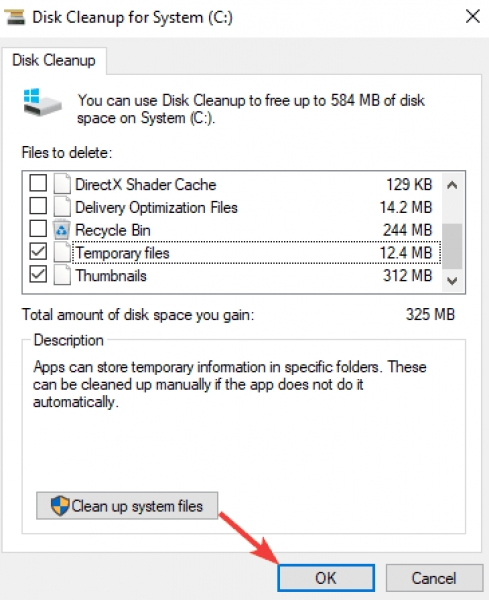
- Press Windows Key + S and enter disk cleanup. Select Disk Cleanup from the list of results.
- Select the C drive and click OK. Wait while the application scans your PC.
- Make sure to check Temporary files and then click on OK. If you want, you can select other file types.
After the cleanup process is finished, the cache and temporary files should be removed completely.
Removing app backup files and cache is pretty simple, and unless you’re an experienced PC user, we suggest using specialized tools for this task.







 October 26, 2020
  407 views,
  3 comments